AustinTek: Wifi Connectivity, Installation and Setup; Business, Appartment Complexes, Events, Trade Shows, Conferences, Meetings, Conventions, Indoor/Outdoor, Permanent/Temporary
Copyright © 2004-2013 Joseph Mack
06 Nov 2013
Table of Contents
AustinTek provides wifi connectivity for conferences, meetings, conventions, outdoor events (zoo, fairgrounds, gardens) and installs permanent wifi setups for businesses, appartment complexes, libraries and hospitals (anyone who wants wifi). Security can be from fully open, to fully encrypted on every segment of the network, allowing sensitive data (e.g. business or HIPAA medical data) to be transferred securely. AustinTek is in RTP Triangle, Durham, Chapel Hill, Cary, Raleigh, Wake Forest and nearby Triad area in North Carolina. Service outside this area can be arranged for the cost of travel.
Accompanying network services (e.g. internet name registration, VPN, VLAN, DNS, DHCP, mail and web servers) are available as well.
Wifi is a technology that allows computers to communicate via a radio (wireless) link. Since the computer no longer requires a cable for network connection, wifi allows
- people with portable computers (e.g. laptops and PDAs) to stay connected while they move from within a business location
- people to be connected at places where there is no fixed network connection. This could be for a visitors at a work place, or for attendees and exhibitors at a conference or at a business show or convention.
- You let the users/attendees know that you have wifi connectivity and to bring their 802.11b/g enabled devices (e.g. laptops, PDA).
On connecting via a wifi link (a wireless access point - WAP), the user, the customer and the exhibitors, have the same internet connectivity as at home or at work.
They can -
- send e-mail and images anywhere they like (e.g.off-site)
- retrieve e-mail from their off-site e-mail machine
- surf the web
- exchange e-mail and files with other users/attendees
-
access information provided on the local fixed network
which might be
- web and file servers containing class materials
- announcements, schedules for the day
- view images from wifi cameras, showing events at other locations.
- receive streaming audio/TV
- work in privacy. This might allow a parent to bring children to an event, knowing that they can sit and work while the children have fun, when previously they would have had to choose between not being able to do their work or not coming at all.
- Press/Media people can send their on-site copy and images, getting the story out promptly.
- Exhibitors can access their off-site databases, records and promotional materials, and enter orders in realtime, rather than having to enter them on a laptop and then move them over by hand after the show.
- We can set up a local web site, showing maps, schedules, food menus and prize lists.
- We can connect up your servers containing materials for the attendees.
- We can provide webcams, for sites spread over a large area (several rooms or a large outdoor event), making images available for people to check activities at other locations in the event.
- We can coordinate broadcast of local streaming video/audio.
- We can provide an external web site to promote businesses and events to people who can't be there physically. This website can include images from the on-site webcams.
Where WAPs are spread over a large enough area, a treasure hunt can center around finding the WAPs, and on completion, winners can receive a "Wifi Master" button.
Installation at appartment complexes and businesses: You can let the residents or business people handle it themselves. If you as the building owner handle it, the installation will be cheaper overall. You'll have to bother with it instead of them, but if you're the building owner you're already in the service business; you're supplying heat/cooling, water, electricity etc. Wifi is another opportunity to supply a service and for your clients to see you as helping them with their lives.
For permanent installations: we install the equipment, integrate it into your infrastructure and train your staff to run it. For installations with no staff available and minimal infrastructure (e.g. coffee shops with only one sales person), we offer a turnkey solution that requires minimal attention from staff.
For shows and conferences: we setup the equipment and provide the staff to run it. We provide help for users wanting to connect.
Users need an 802.11b/g enabled computer or PDA. Newer laptop computers already have these. Earlier laptops require a a pcmcia wifi card costing about US$25-75. For a PDA, you can clip in a similar device. The radio link replaces an ethernet cable, allowing the computer to be networked (as long as the user stays in wifi range).
At the other end of the radio link is a wireless access point (WAP) which is connected to (part of) the cabled (fixed, wired) network. The range available, about 100yrds, is limited by design, so that people in proximity can have their own wifi links without mutual interference. The 100yd range allows people to move about an office or to be in range of a WAP at a restaurant or tent at an outdoor event. Visitors can join the network without needing to be plugged into a spare ethernet jack and can work anywhere they're comfortable.
For operation over a larger area, multiple WAPs are used with roaming, allowing the user to move from place to place while staying connected. A second layer of WAPs (invisible to the users) relays packets back to the internet connection.
We provide the connectivity between the wifi enabled computers of the users/attendees, the computers of the customers, and the internet.
We use the connectivity to the internet already available locally e.g. local DSL, T1, dial-up, or we provide/install the connection.
We provide a router that serves dhcp to the wifi enabled attendees (gives the portable computers an IP, so that they can connect), static IPs for the customer's computers, webcache, firewall, local ftp and a scratch area for windows filesharing.
WAPs
We install the WAPs. You provide a safe (weather, theft, damage) location for the WAPs. The WAPs need 120V and a cabled connection to the network (we will coordinate this with the people on-site). UPSs are normally required at each location to condition power for the WAPs and to keep connections up in case of temporary power failure. For extended locations (e.g. a zoo or fairgrounds), extra waps will be installed to relay packets back to the internet connection.
network router
We provide the multifunctional router which
- has a graphical display showing the number of wifi users, the WAPs that each user is connected through, the IP of each client machine, the amount of ethernet traffic for each wap and for the wifi server.
- allocates dynamic IPs to the portable computers (via dhcpd), allowing them to join the internet.
- is a firewall, with rules to the customer's requirements. This regulates access between the fixed network, the portable computers and the internet.
- is a router to the internet (sends packets to and receives packets from the internet).
- has a webserver for a local website - this website can show maps, schedules, food menus, prize lists...
- has a webcache to accelarate throughput of webpages from the internet.
- forwards outgoing e-mail
- has a scratch area for sharing windows files
- has an ftp site
access to the internet
You provide access to the internet (if needed). If an on-site internet connection is not available, we can provide it (e.g. through a satellite connection).
webcams
We provide webcams and connect them up to the local website. If you want images relayed off-site, for people who can't attend, we handle that too. Like the WAPs, they need 120V power and a safe location (but we'll install them).
external website
We can provide an external web site to promote businesses and events to people who can't be there physically.
failover
Also available, as an option, is a high availability failover pair. On hardware failure, a backup machine automatically takes over when the active machine fails. This is for situations where the wifi cannot go down for the time it takes to fix a hardware failure.

Note Oct 2009: I've had machines up for years without failure. The complexity of failover software becomes a problem at this level of reliability. As well keeping a standby machine running idle, for years at a time, just adds management problems. You can have failover if you want it, but I'm no longer offering it as the default.
Here are examples of the logs available at the router. For each wap, there are logs of cpu usage, load average and memory usage. Similar logs are available for the network router.
Figure 1. Network bandwith through WAP 136
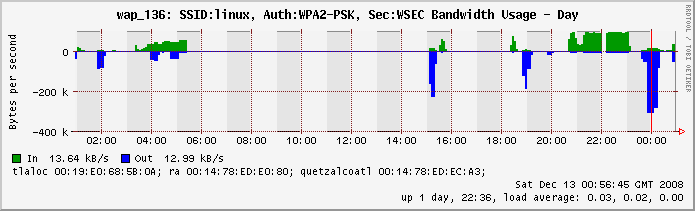 |
For wap_136 this graph shows
- the rate at which packets are coming into the wifi clients (blue)
- the rate at which packets are going out of the wifi clients (green)
Figure 2. Associations to WAP 136
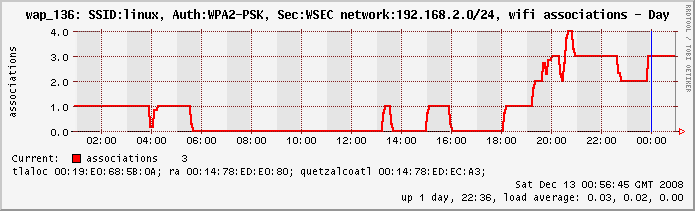 |
For wap_136 this graph shows
- the SSID (linux), the authorization scheme (WPA2), the security protocol (WSEC)
- the network (192.168.2.0/24)
- the number of wifi clients associating (connecting) through this wap (currently 3), their names (tlaloc, ra, quetzalcoatl) and the MAC addresses of each
- the time/date and some information about the state of the wap (uptime, load average)
Wifi is a broadcast medium - anyone close by with a wifi card can pick up the radio signal. To prevent people snooping the content, the signal must be encrypted. Encryption requires the user to have a key (shared secret). Several levels of security are available:
none: In some installations e.g. restaurants, coffee shops, college campuses, apartment complexes, hotel guests, where convenience of access is more important than security, or it's impossible to keep the key secret, encryption is not used. Users must understand that their network traffic can be intercepted. Users can set up their own VPNs or do their own encryption and still be secure. These installations can run without staff intervention and need minimal maintenance.
WEP: WEP was the first security standard devised for wifi. It is no longer recommended for new installations. However the "b" wifi cards can only use WEP, so WEP must be available for these users. WEP is breakable by an observer who intercepts a sufficient number of wifi packets and for this reason, the key should be changed at intervals. WEP provides a minimal level of security and prevents anyone but a determined intruder from being able to join the network. For some installations (e.g. workplaces and libraries, conferences) WEP is used to prevent unauthorised access to the network by people looking for a free ride, rather than to provide absolute security. WEP is suitable for networks with a small number of users (e.g. the home), where you can control the number of people with the key and you don't want the neighbors using your network.
WPA/WPA2: For this the users require an 802.11g (the current standard, common after 2006) rather than the older 802.11b type wifi adapter. WPA/WPA2 is a recent security standard for wifi and encompasses a number of unbreakable encryption schemes. WPA/WPA2 is required for any environment where security needs are absolute (e.g. HIPAA, internal access within a business). WPA/WPA2 requires that encryption keys be setup in the laptop. In the case of a stolen or lost laptop, the keys can be revoked and the stolen/missing laptop will not be able to access the wifi network. WPA/WPA2 does not work with the older "b" wifi cards (new wifi cards are about $25). WPA2 requires SP3 for WinXP.
- authorization/authentication WEP and WPA will allow anyone with the laptop to access the network. For ultimate security, you can also require the user to enter a password before being allowed to access the network.
In all cases we can install (or train your staff to install) the encryption keys.
Table 1. Differences between Permanent and Temporary Wifi Installations
| parameter | Permanent | Temporary |
|---|---|---|
Staff to operate installation | We train your staff | We provide the staff |
Help with users | We train your staff to help the users and provide documentation. | We help users |
hardware | We provide the hardware (we can install or upgrade your fixed network too) | You provide hardware (we will suggest hardware and providers) or we will provide the hardware (your choice). |
software | We provide the software | We provide the software |
connectivity guarantee (our installation, not power or internet connection etc) 8hr day, 128 users. | No downtime warrantees. Free software calls for 30 days. Service contract available after 30days. | less than 15min down time, no penalty 15-30min down time, half fees charged for day 1hr downtime (or more), no fees charged for day |
firewall warrantee | Warrantee is difficult once we hand over control to your staff. However we're happy to discuss this further. | Penalty of half fee for day, if someone can demonstrate, to staff, access from the outside to a wifi connected computer. Max penalty, one intrusion/day. No warrantee for intrusion by computer coming in over wifi. |
Here I am providing wifi connectivity for a 5-day, 500 people outdoor event. Internet connection was by satellite.
Figure 3. Outdoor Event for 500 people
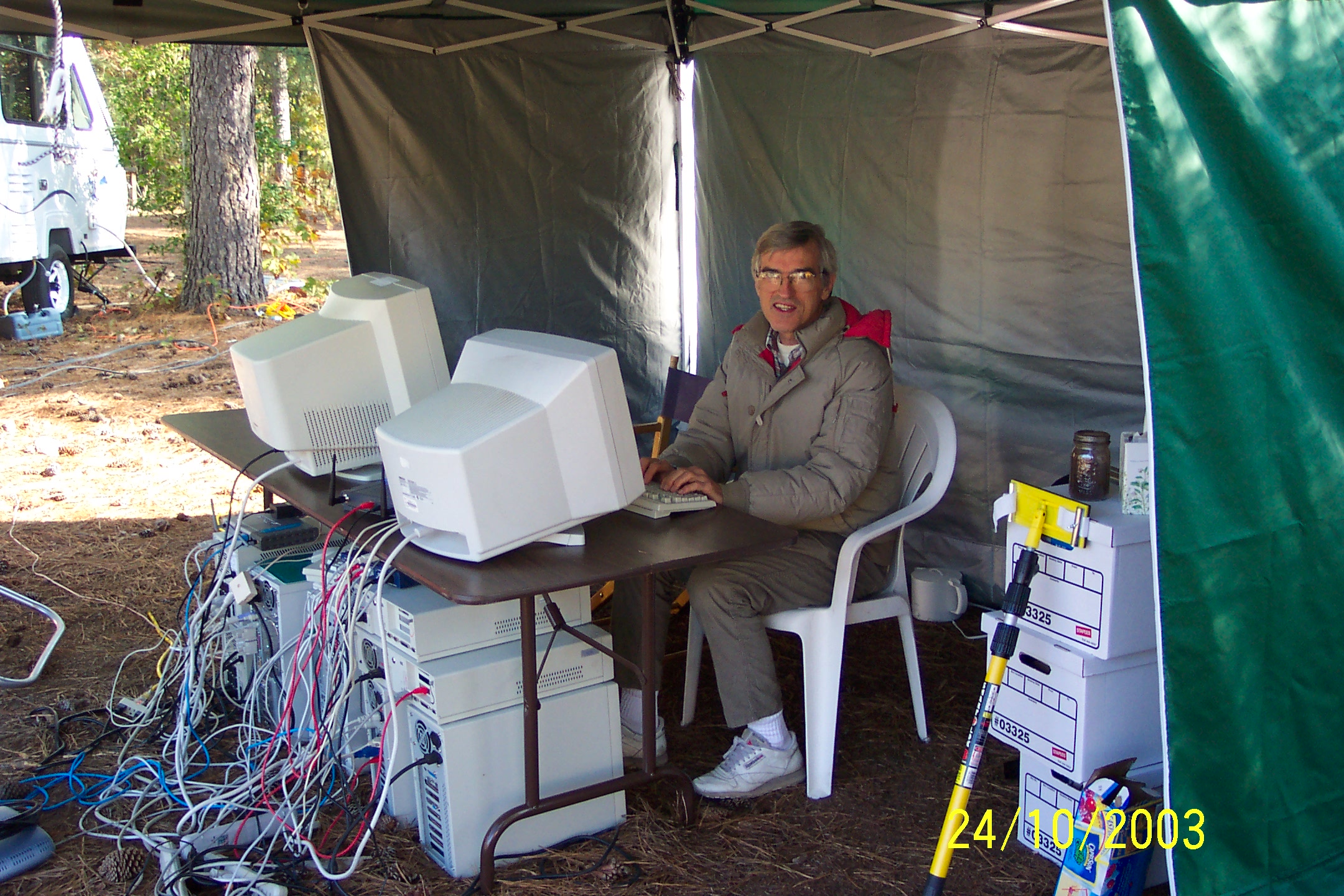 |
From my chin, this is day 3 or 4. Look under the table - who said wifi is wireless?
Here I am providing connectivity in a field for 100 people, with about 30 visitors arriving in the weekend. Internet connection was by cell phone.
Figure 4. Graph of users connecting at 100 person outdoor event
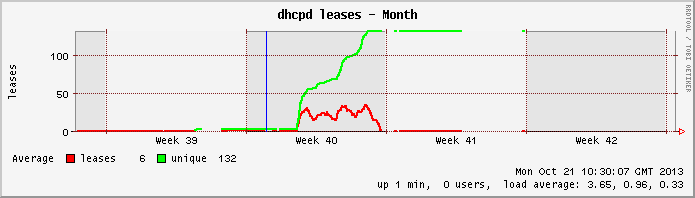 |
The event started on the tuesday of week 40 (beginning of October), when the number of unique users (green) started to increase rapidly. The number of users jumped on the friday and saturday as people arrived from work. The number of people logged on to the network at any one time is in red. The event is 24*7 so the number of users connecting doesn't drop much at night. The number of users dropped gradually on sunday as people packed up and left.
I brought the gear back at the end of festival (gap in data at the end of week 40). On my return, I turned it on again for a few days, and then disconnected it in the middle of week 41.
Joseph Mack e-mail: jmack (at) austintek (dot) com phone: (c) (919)-972-1806 Durham, NC, 27713-8010 |